Grounding AI Agents with Live Web Search: A Practical Guide
How to ground AI agents, LLM tools, and RAG pipelines with live web search using a search API for LLM grounding, with OpenSERP SDK and MCP server examples for Claude.
Updated
On this page
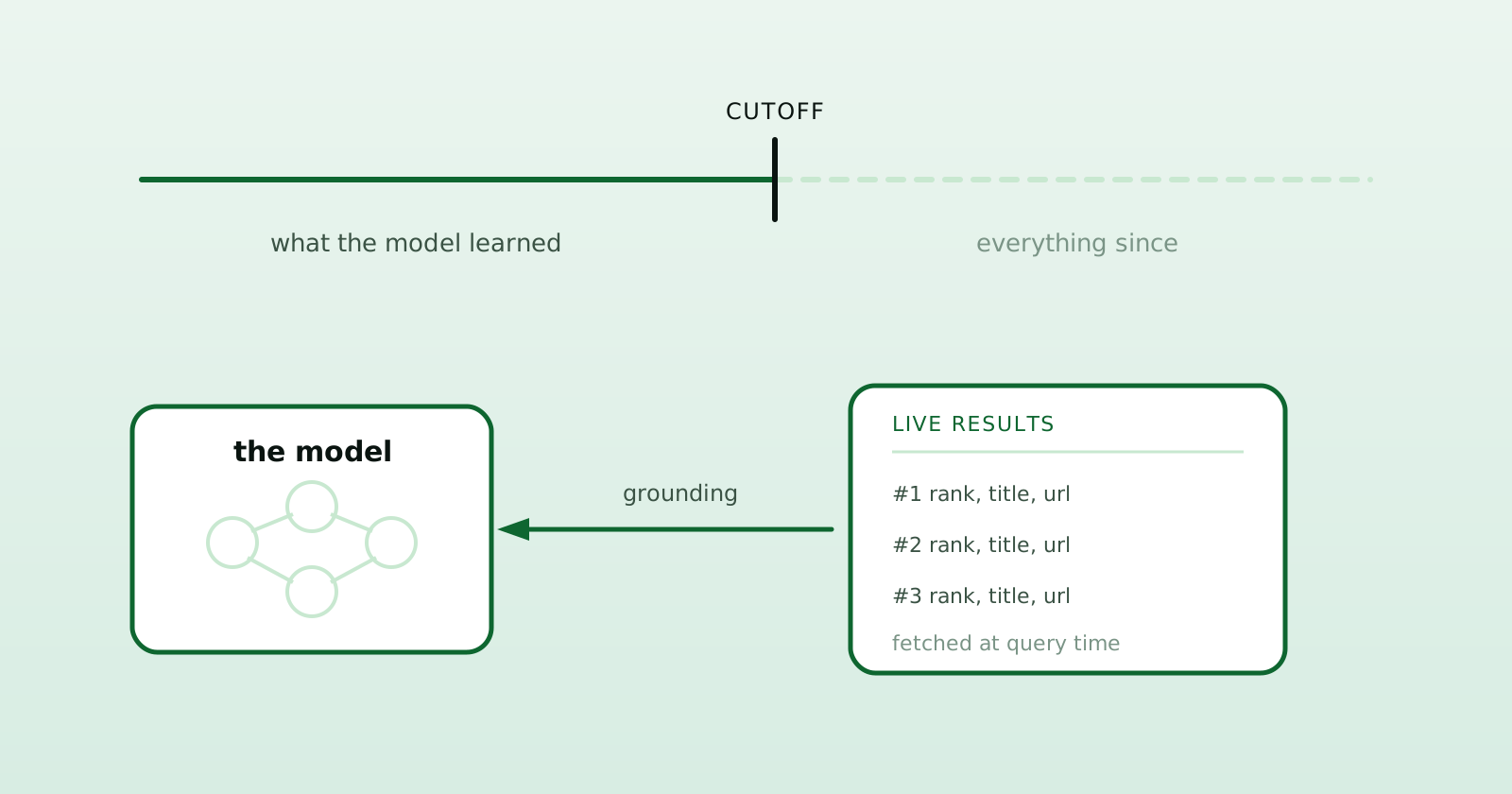
A model’s built-in knowledge is fixed after training. Ask about a release that shipped last week or a price that changed yesterday, and it may refuse, guess, or answer from stale information. Grounding fixes this: fetch live results at query time and feed them into the model as context, so the answer can use current, citable sources.
This guide shows how to ground AI agents, LLM tools, and RAG pipelines with a search API for LLM grounding. It covers why multi-engine results and structured JSON matter, then builds a grounding loop with the OpenSERP SDK and wires OpenSERP into Claude as an MCP tool.
Why you need a web search API for grounding
You could scrape Google yourself inside your agent. Don’t. Search engines change their HTML, block automated traffic, and serve CAPTCHAs. Application code is the wrong place to handle all that parser and access-control work. A dedicated web search API turns “search the web” into a single function call that returns structured data.
Two properties make a search API genuinely good for grounding:
- Structured JSON output. You want
rank,title,url, andsnippetas fields, not HTML you have to re-parse. Structured results drop straight into a prompt template or a tool-call response. - Multi-engine coverage. Different engines surface different results. Searching Google, Bing, and Yandex can uncover regional or specialist sources one result set misses. It does not make repeated claims true; verification still happens at the source level.
OpenSERP returns exactly that shape from Google, Bing, Yandex, Baidu, DuckDuckGo, and Ecosia. The same SDK can target either the self-hosted server or the managed API.
A minimal grounding loop
The core pattern is three steps: search, format results into context, then prompt the model to answer using only that context with citations. Here it is end to end with the @openserp/sdk:
npm install @openserp/sdk
export OPENSERP_API_KEY="osk_live_xxxxxxxxxxxxxxxxxxxxxxxxxxxxxxxx"
import { OpenSERP } from "@openserp/sdk";

const client = new OpenSERP({ apiKey: process.env.OPENSERP_API_KEY });
const question = "What is retrieval augmented generation?";

const { results } = await client.search({
  engine: "google",
  text: question,
  limit: 10,
});

const context = results
  .map((r, i) => `[${i + 1}] ${r.title}\n${r.url}\n${r.snippet ?? ""}`)
  .join("\n\n");

const prompt = `Answer the question using only the search results below. Cite sources as [n].

Question: ${question}

Search results:
${context}`;
Hand prompt to your LLM and it has the material and citation format for a grounded answer. The [n] markers map back to the results array, so you can render real source links in your UI. Validate that every citation exists and supports the sentence attached to it.
Pulling page content, not just snippets
Snippets are short. When you need the model to reason over page text, ask the search call to extract and clean the top results in one request:
const { results } = await client.search({
  engine: "google",
  text: "what is a serp api",
  extract: 2,
  extractMode: "auto",
});

for (const r of results) {
  const content = r.extracted?.content;
  console.log(r.rank, r.title, content?.slice(0, 300).trim());
}
This collapses “search, then fetch and clean each page” into a single API call, which is the input a RAG pipeline usually wants.
Exposing search as a tool
If you are building an AI agent rather than a one-shot answerer, expose search as a callable function the model can invoke when it needs fresh information. Keep the return value JSON-serializable:
import os
from openserp import OpenSERP

def web_search(query: str, limit: int = 10) -> list[dict]:
    """Search the web and return a compact list of results."""
    with OpenSERP(api_key=os.environ["OPENSERP_API_KEY"]) as client:
        response = client.search(engine="google", text=query, limit=limit)
        return [
            {"rank": r.rank, "title": r.title, "url": r.url, "snippet": r.snippet}
            for r in response.results
        ]
Register web_search with your tool framework, and the model can ground answers on demand.
Corroborating across engines
For higher-stakes grounding, merge results from several engines and deduplicate before building context. One call does it:
const mega = await client.megaSearch({
  text: "openserp api",
  engines: ["google", "bing", "duckduckgo"],
  mode: "balanced",
  limit: 20,
});

console.log(mega.results.length, "merged results");
mode: "balanced" merges and deduplicates across engines; "any" returns the first successful engine (cheaper); "fast" uses the fastest healthy engine. For claim verification, use balanced to find independent publishers, then check the underlying pages. Search engines are discovery channels, not independent witnesses.
Giving Claude live search via MCP
The Model Context Protocol (MCP) is the cleanest way to give a chat assistant tools. The OpenSERP MCP server (@openserp/mcp) exposes search, multi-engine search, image search, and URL extraction as MCP tools that Claude can call directly.
For Claude Desktop, add this to claude_desktop_config.json:
{
  "mcpServers": {
    "openserp": {
      "command": "npx",
      "args": ["-y", "@openserp/mcp"],
      "env": {
        "OPENSERP_API_KEY": "osk_live_xxxxxxxxxxxxxxxxxxxxxxxxxxxxxxxx"
      }
    }
  }
}
For Claude Code, one command registers it:
claude mcp add openserp --env OPENSERP_API_KEY=$OPENSERP_API_KEY -- npx -y @openserp/mcp
At publication, restarting the client gives Claude search, mega_search, fast_search, any_search, image_search, mega_image, extract, get_usage, and list_engines. Other MCP clients use their own configuration format, but the same server command and environment variables carry over.
Prefer a self-hosted OpenSERP instance? Set
OPENSERP_BASE_URLand drop the API key. The MCP server and SDK support both deployment modes.
Practical tips for grounding quality
- Constrain the model to the context. “Answer using only the results below” plus a citation format can reduce unsupported claims compared with passing raw results without instructions.
- Tune
limitto your token budget. Ten results is a practical default; raise it for broad questions, lower it for tight context windows. - Use the right region and language. Pass
regionandlangso you ground on the locale your user actually cares about.region: "US"andregion: "DE"return materially different SERPs. - Go multi-engine for international work. Choose engines from the user’s market and language rather than assuming one Western result set is representative. Google, Bing, and Yandex are a practical starting mix for many multilingual searches.
- Handle failures explicitly. Search can be rate-limited or challenged; catch errors and degrade gracefully rather than letting a failed search crash the turn.
Next steps
Grounding turns a model with fixed built-in knowledge into one that can use what happened this morning. The building blocks are a structured, multi-engine web search API, useful page content, and a prompt that requests traceable citations.
Get a key from the Cloud quickstart, browse the usage examples for more recipes, or run the open-source server locally and ground entirely on your own infrastructure. The endpoints reference documents every parameter and the full response envelope.
Evaluating providers? The search API comparison for LLM grounding puts OpenSERP next to Tavily, Exa, and Firecrawl by workflow fit.

Written by Rustem
I build OpenSERP - the open-source SERP API behind these posts. Spotted something wrong, or want a topic covered? Get in touch.