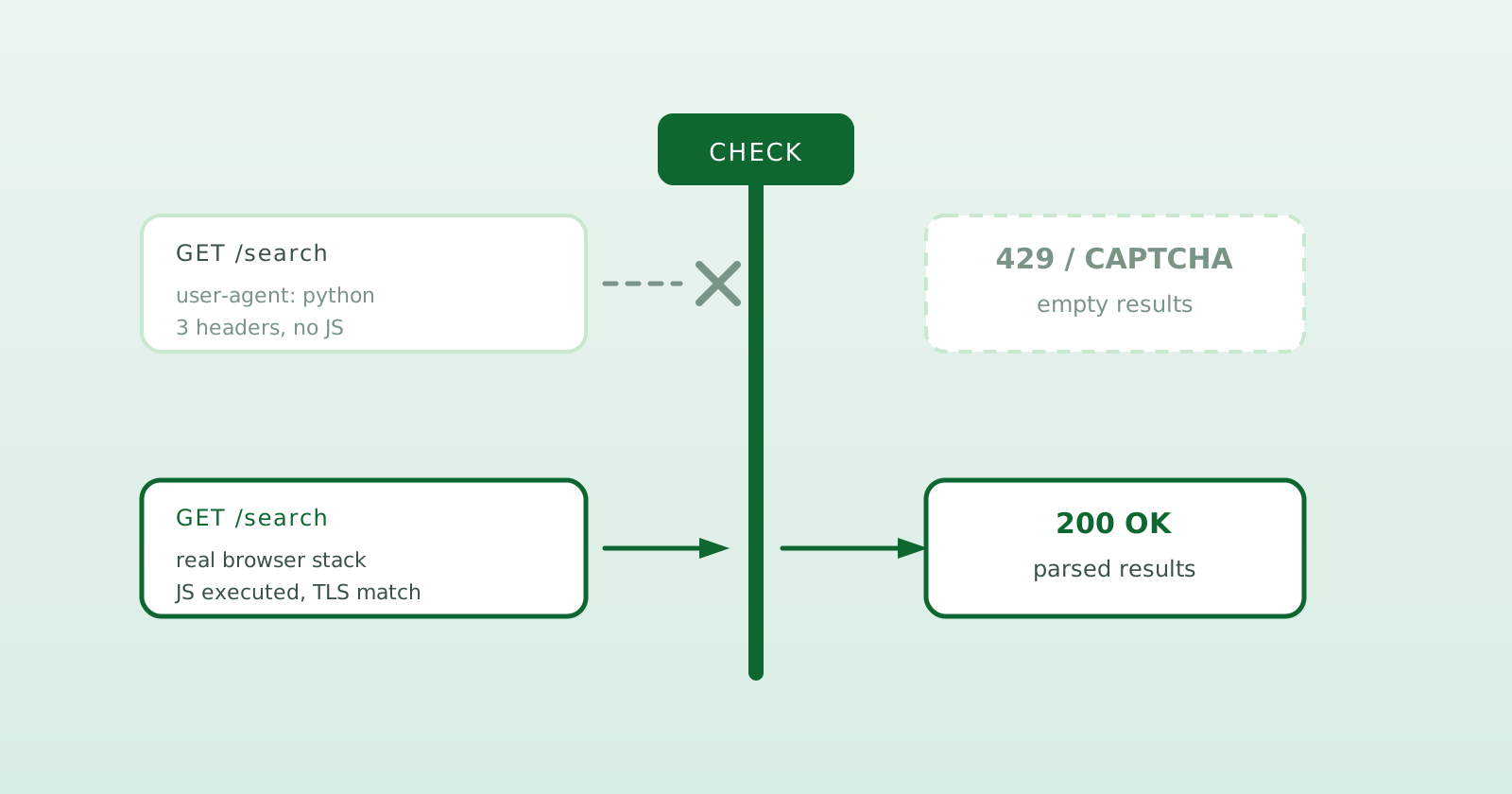
You wrote the scraper. It worked beautifully - for about a day. Then the CAPTCHAs showed up. Then the 429 Too Many Requests. Then the worst one: not an error at all, just empty results, or a page of HTML that looks nothing like what you saw in your browser. Your code didn’t change. The internet just decided it doesn’t like you anymore.
If this is you: the parser may be fine. The problem is often the way the request is made or the page variant that comes back. Let’s walk through why it happens and the actual fix.
Why search engines block you
Search engines really, really don’t want to be scraped at scale, and they’ve gotten frighteningly good at spotting automation. They’re not checking one thing - they’re scoring you across many signals at once:
- Request rate. Humans don’t fire 50 searches a second from one IP. Your script does. Instant red flag.
- Missing browser fingerprint. A real browser ships a huge, consistent set of headers, TLS characteristics, and JavaScript-runtime quirks. A bare HTTP client ships a thin, suspiciously tidy request.
- No JavaScript execution. An HTTP client downloads the initial HTML and stops. If the useful content renders later, your parser never sees it.
- IP reputation. Repeated automated requests from one address or network can attract challenges quickly.
- The wrong page. Consent screens, localization, experiments, and challenge pages can all return
200 OKwith HTML your parser was not built for.
Add those up and you get the classic escalation: a CAPTCHA to slow you down, then rate limits, then a soft block where results just… stop. The frustrating part is that a basic HTTP scraper can trip several of these signals at once.
The fix isn’t more proxies - it’s looking like a browser
When the CAPTCHAs hit, everyone’s first instinct is to throw a proxy pool at the problem. Changing IPs can help with rate and reputation, sure. But it does nothing about the deeper tells: you still don’t run JavaScript, you still have a thin fingerprint, and you still don’t look like a browser. So you burn money on proxies and the CAPTCHAs come back anyway, just slower.
The durable fix is to stop pretending to be a browser and actually be one.
A real, rendered browser request:
- Executes JavaScript, so you can read content that only exists after scripts run.
- Carries a complete, consistent fingerprint, because the headers, TLS, and runtime behavior come from the same browser.
- Exposes the rendered page, which makes consent screens and other non-result responses easier to detect.
A headless browser is still automation and can still be challenged. Request rate, network reputation, and parser maintenance do not disappear. You have simply removed one major source of mismatch.
Do you really want to build and run this yourself?
You can glue this together - headless browser, fingerprint tuning, proxy rotation, CAPTCHA handling, a parser per engine, and then re-fixing all of it every time Google quietly changes its HTML. People do. It’s also a genuine, ongoing maintenance job, and “the parser broke again at 2 a.m.” is a real way to spend your evenings.
Or you point at something that already does it. OpenSERP is a self-hostable SERP API built around exactly this approach: it drives a real rendered browser with custom browser-profile fingerprint control (not a generic stealth toggle), parses the result page, and hands you clean structured data. It’s free, open source, and runs as a single binary - no Redis, no extra services, caching built in.
# Real browser under the hood. No API key. No external services.
docker run -p 7000:7000 karust/openserp serve
curl "http://localhost:7000/google/search?text=scrape+google+without+blocks&lang=EN"
You get back structured JSON - rank, title, url, domain, snippet - in one stable response shape. Your application does not need to change with every page layout, although the parser still needs maintenance when an engine changes. From an SDK:
npm install @openserp/sdk
import { OpenSERP } from "@openserp/sdk";

const client = new OpenSERP({ baseUrl: "http://localhost:7000" });

const { results } = await client.search({
  engine: "google",
  text: "scrape google without blocks",
  limit: 10,
  region: "US",
});

for (const r of results) {
  console.log(r.rank, r.title, r.url);
}
And because it’s browser-based, the same interface handles Google, Bing, Yandex, Baidu, DuckDuckGo, and Ecosia - so your application does not need a separate response schema for every engine.
A quick reality check on scale
Browser rendering is more reliable, but no method makes blocks literally impossible - anyone selling you “100% never blocked” is selling you something. The honest version is: render like a browser, control your fingerprint, be reasonable about request rate, detect challenge pages, and blocks become much less frequent. That’s the difference between a scraper you babysit and one you can actually build on.
If you’d rather not run and scale the browsers yourself, the managed OpenSERP Cloud exposes the compatible API behind a key - the infrastructure and rendering are handled, and you just make requests.
TL;DR
- CAPTCHAs,
429s, and empty or garbled results can mean your scraper looks like a bot - too fast, thin fingerprint, no JavaScript. - More proxies treat one part of the problem, not the whole cause.
- The practical fix is browser-rendered requests with fingerprint control, plus sensible rates and challenge detection.
- Build it yourself, or let OpenSERP do it - free, open source, single binary.
Want the bigger picture on structured search data? Read What Is a SERP API? Curious how this compares to a privacy metasearch engine? See SearXNG vs OpenSERP.